
![How Much Does 3D Printing Cost?[+ Free Cost Calculator]](https://ufc-dtc-cms.oss-accelerate.aliyuncs.com/blog/20241017/210501_ng2palml6.png)
Learn about 3D printing costs, including in-house vs. outsourcing options, with a free cost calculator and saving tips.
Introduction
3D printing has revolutionized many industries, from rapid prototyping to creating end-use parts. However, when it comes to the cost of 3D printing, there’s actually no simple answer.
The price can vary widely depending on several factors, including whether you're printing in-house or outsourcing, as well as the materials, technology, and complexity of the project.
In this article, we’ll break down the costs for both options and also share some useful tips on how to save.
In-house Printing Costs
In-house 3D printing can be an exciting and cost-effective way to bring your ideas to life. However, to truly understand the total expenses involved, you need to consider several factors beyond just the printer itself.
Let’s break down these costs to give you a better idea of what you’re looking at when printing at home or in a small business setting.
3D Printer Purchase Price
When it comes to the cost of a 3D printer, prices can vary dramatically depending on the type of printer you’re looking at: industrial 3D printers or desktop 3D printers.
Industrial 3D printers are designed for large-scale production, prototyping, and high-precision manufacturing. These machines can handle more advanced materials, including metals and high-performance plastics, and often feature larger build volumes and faster print times. Industrial 3D printers typically range from $20,000 to over $1,000,000.
On the other hand, desktop 3D printers, commonly using FDM (Fused Deposition Modeling) technology, are more accessible for small businesses, hobbyists, and educational institutions.
Desktop 3D printers are much smaller, designed for prototyping, personal projects, or small-scale production. They are easy to use and support materials like PLA, ABS, and resin. They are generally much more affordable, with prices ranging from $200 to $5,000.
We have made a comparison table of the most popular desktop FDM printers for your reference.
Printer | Price | Build Volume (mm) | Estimated Print Time (200 x 150 x 50 mm) | Applicable Materials | Advantages |
|---|---|---|---|---|---|
Creality Ender 3 V2 Neo | $199 | 220 x 220 x 250 | 12-15 hours | PLA, ABS, PETG | Affordable, ideal for beginners; solid entry-level machine |
Prusa i3 MK3S+ | $1049 (semi-assembled) | 250 x 210 x 210 | 8-10 hours | PLA, ABS, PETG, ASA, Nylon, Flex | Highly accurate with excellent print quality; automatic bed leveling and flexible material compatibility |
Bambu Lab X1C | $1,449 | 256 x 256 x 256 | 4-5 hours | PLA, ABS, PETG, PA, PC, Carbon/Glass-reinforced materials | Fastest printing speed, multi-color capabilities, advanced sensors (LIDAR, humidity) |
Elegoo Neptune 4 Pro | $359 | 225 x 225 x 265 | 4-5 hours | PLA, ABS, PETG, ASA, TPU, Nylon | Best value for fast printing and quiet operation at a budget-friendly price |
Anycubic Kobra 2 Max | $429.99 | 420 x 420 x 500 | 4-5 hours | PLA, ABS, PETG, TPU | Largest build volume for large prints, great for big projects |
In Summary:
Creality Ender 3 V2 Neo: The most budget-friendly, making it ideal for beginners or hobbyists.
Prusa i3 MK3S+: Offers the best print quality and accuracy, with a wide range of compatible materials and advanced features like automatic bed leveling.
Bambu Lab X1C: Stands out for its speed, multi-color printing, and advanced technology like LIDAR sensors and humidity control.
Elegoo Neptune 4 Pro: Combines affordability with fast and quiet operation, making it one of the best choices for those on a budget seeking speed.
Anycubic Kobra 2 Max: Excels with the largest build volume, perfect for large-scale projects, and still manages to keep costs reasonable.
Material Costs
One of the main ongoing expenses is the material used in 3D printing, typically filament. Prices vary depending on the material type, quality, and brand. Common materials for desktop 3D printing include PLA, ABS, PETG, and ASA.
● PLA is one of the most affordable and user-friendly materials, usually priced between $20 and $30 per kilogram.
● ABS is another popular option, especially for parts requiring strength and durability, with prices typically between $25 and $35 per kilogram.
● PETG combines ease of printing with strength, and it can cost around $30 to $40 per kilogram.
● ASA is known for its UV resistance and toughness, making it a great choice for outdoor parts, priced similarly to ABS, but sometimes slightly higher depending on the supplier.
For a more detailed comparison of these materials, check out our article on ASA vs ABS vs PETG vs PLA.
Electricity Costs
When it comes to 3D printing, electricity usage is generally modest, but the costs can add up with long or frequent print jobs. Here’s a quick overview:
● Power Consumption: Most desktop 3D printers draw between 50 and 150 watts per hour depending on the model and the complexity of the print.
● Hourly Cost: On average, running a 3D printer costs around $0.005 to $0.015 per hour at typical US electricity rates of $0.12 per kWh.
● Longer Prints: While individual prints may not cost much, the longer the print, the higher the total electricity cost. For example, a print that runs for 12 hours may add about $0.15 to your overall expenses.
● Factors at Play: The energy cost will vary based on your printer’s power efficiency and your local electricity rates. Some newer or more energy-efficient models use less power, lowering the cost.
Maintenance and Repairs
Regular maintenance is crucial for keeping your 3D printer running smoothly and preventing breakdowns. While many of the tasks are simple, they do add to the overall cost of operation over time.
● Routine Maintenance: Regular maintenance ensures optimal printer performance. This may include cleaning the print bed, lubricating moving parts, and adjusting settings.
● Replacement Parts: Over time, certain components may wear out and need replacing.
Nozzles: Standard brass nozzles cost between $5 and $20.
Durable Nozzles: Hardened steel or wear-resistant nozzles can range from $10 to $40.
● Other Replacements: Parts like belts, motors, and fans may also need replacement, depending on usage and printer model.
● Ongoing Costs: Regular maintenance, although essential, adds to the overall cost of printing. However, it helps prolong your printer's lifespan and maintain consistent print quality.
Labor Costs
Although 3D printing is largely automated, human involvement is still essential at various stages of the process. For personal users, labor costs are generally minimal, but for business-related 3D printing tasks, these costs should be taken into account.
Here's a breakdown of the tasks that contribute to labor costs:
● File Preparation: Before printing, you’ll need to prepare the 3D model. This includes tasks like scaling, adjusting supports, and ensuring the file is properly formatted for the printer.
● Monitoring the Print Process: Even though 3D printing is automated, you still need to keep an eye on the print to ensure it’s running smoothly.
● Post-Processing: After printing, tasks like removing support structures, cleaning, sanding, and painting are needed to finish the print.
● Packing and Shipping: If the print is for a business order, packing and shipping the final product require additional labor.
Amortized Costs
Amortizing the cost of your 3D printer helps you understand how much you’re really paying per print. For example, if you purchase a $350 printer and expect it to last for 3,000 hours of printing, your amortized cost would be around $0.12 per hour. This cost is spread across all the prints you complete during the printer's lifetime.
Amortized costs may seem like a small, hidden expense, but they’re important for understanding the long-term investment required when owning a 3D printer.
Example: Cost of Printing a LiftPod - Multipurpose Foldable Stand
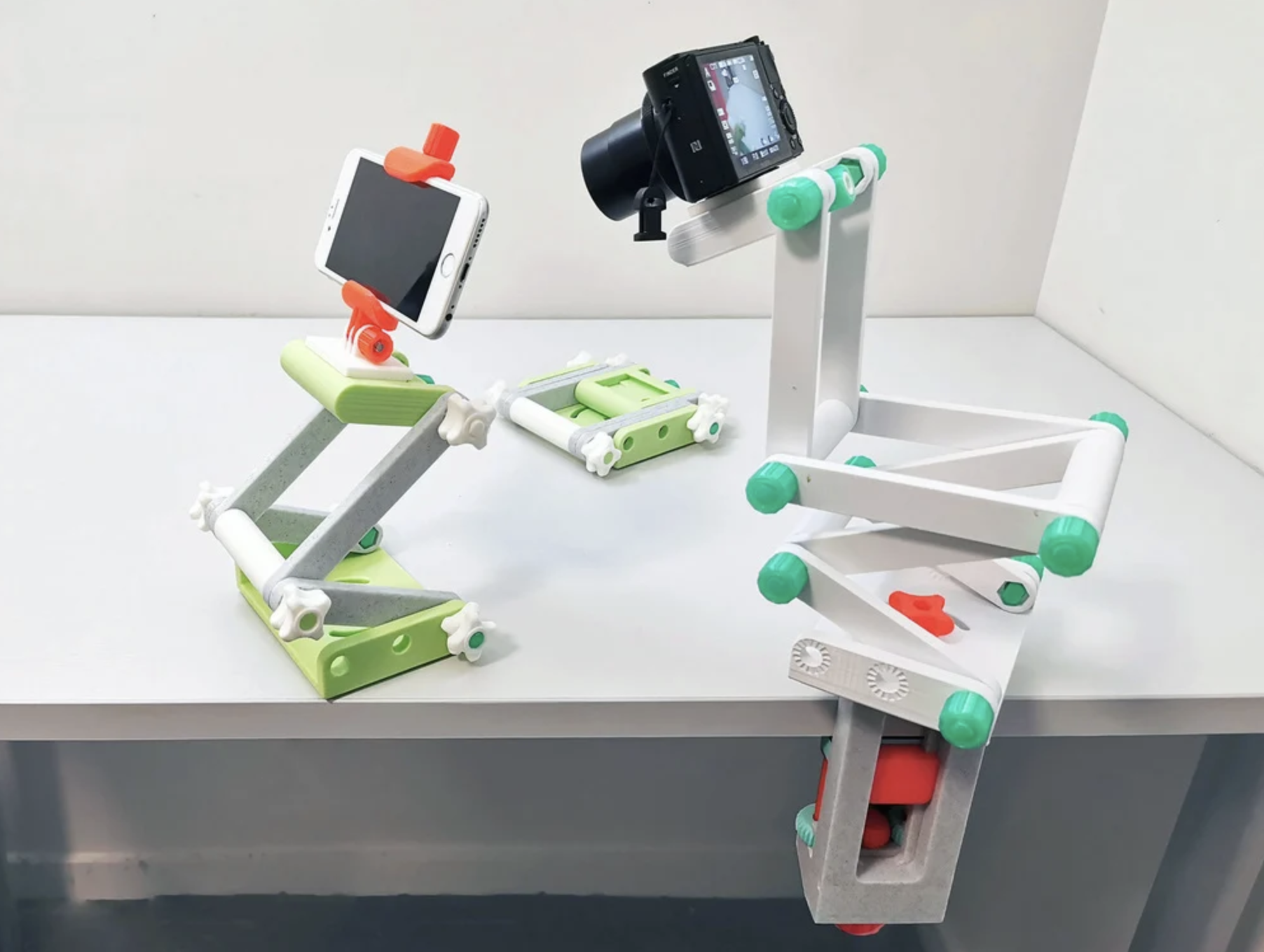
Source: thingiverse.com
Let's walk through an example to illustrate the costs involved in printing a popular and functional 3D model, such as the LiftPod - Multipurpose Foldable Stand, which is frequently downloaded from platforms like Thingiverse.
Printer:
If you’re using an entry-level 3D printer like the Creality Ender 3 V2 Neo, the amortized cost is around $0.10 per hour.
Material:
Let’s assume the print uses 100 grams of PLA (as this stand is slightly larger and requires more material than a simple phone stand), which costs about $1.50 (100g x $0.015 per gram).
Electricity:
The print takes 6 hours, and with an estimated electricity cost of $0.02 per hour, the electricity cost would be around $0.12 (6 hours x $0.02).
Labor:
If it takes you 45 minutes to set up and monitor the print, and you value your time at $10 per hour, the labor cost would be about $7.50.
Now, let’s add it up:
● Printer cost: $0.60 (6 hours x $0.10)
● Material cost: $1.50
● Electricity cost: $0.12
● Labor cost: $7.50
Total cost to print a LiftPod - Multipurpose Foldable Stand: $9.72
This example highlights the breakdown of costs when printing a more complex and versatile model like the LiftPod. The modular design and flexibility of this stand mean it requires more time, material, and labor compared to simpler prints, making it a great example for understanding the cost factors involved in 3D printing more intricate projects.
As you can see, calculating the cost of 3D printing involves several factors. To simplify this process and get a more accurate estimate for your own projects, you can use the 3D Printing cost calculator available here.
Outsourcing 3D Printing Costs
When outsourcing 3D printing, the pricing can be complex due to the variety of factors involved. For 3D printing service providers, costs are driven by many elements including the price of equipment, electricity, materials, labor, maintenance, and facility space.
However, when service providers present a quote to customers, they typically condense all of these considerations into a simpler model, focusing on material costs as a primary driver for the final price.
The total cost of 3D printing when outsourcing includes several key components that come together to form the final price. Here's a breakdown of the major factors:
Total Cost = Printing Cost (material price × part weight) + Post-Processing Cost + Packaging Fees + Shipping Fees + Customs Duty
Now, let's dive deeper into each of these components:
Printing Cost
The printing cost is the most significant component of the total cost. This cost is primarily determined by two variables:
Material Price: This refers to the unit price of the raw material, usually measured per gram. Common 3D printing materials, such as PLA, ABS, PETG, Nylon, and metals like stainless steel and titanium, vary in price based on their performance properties.
Part Weight: This is calculated as model volume × material density. The volume is easily obtained from CAD files, while the density depends on the material used.
Let’s look at an example:
● Material: Nylon PA12
● Price: $0.25 per gram
● Part Weight: 200 grams (based on CAD model and material density)
Printing Cost = $0.25 × 200 grams = $50.00
With Unionfab’s automated quoting system, you can easily upload your CAD files, instantly calculate the part's weight and material usage, and receive an estimated cost within seconds.
*Note: The price shown here is for demonstration purposes. For an official quote tailored to your project, please reach out to our sales team.
For bulk orders, we offer volume discounts and flexible pricing to help you achieve the best cost-efficiency.
To make things even easier, we’ve provided screenshots below that show how you can use Unionfab’s automated quoting system. These images will walk you step by step through uploading your CAD files and quickly receiving an estimated printing cost tailored to your project.
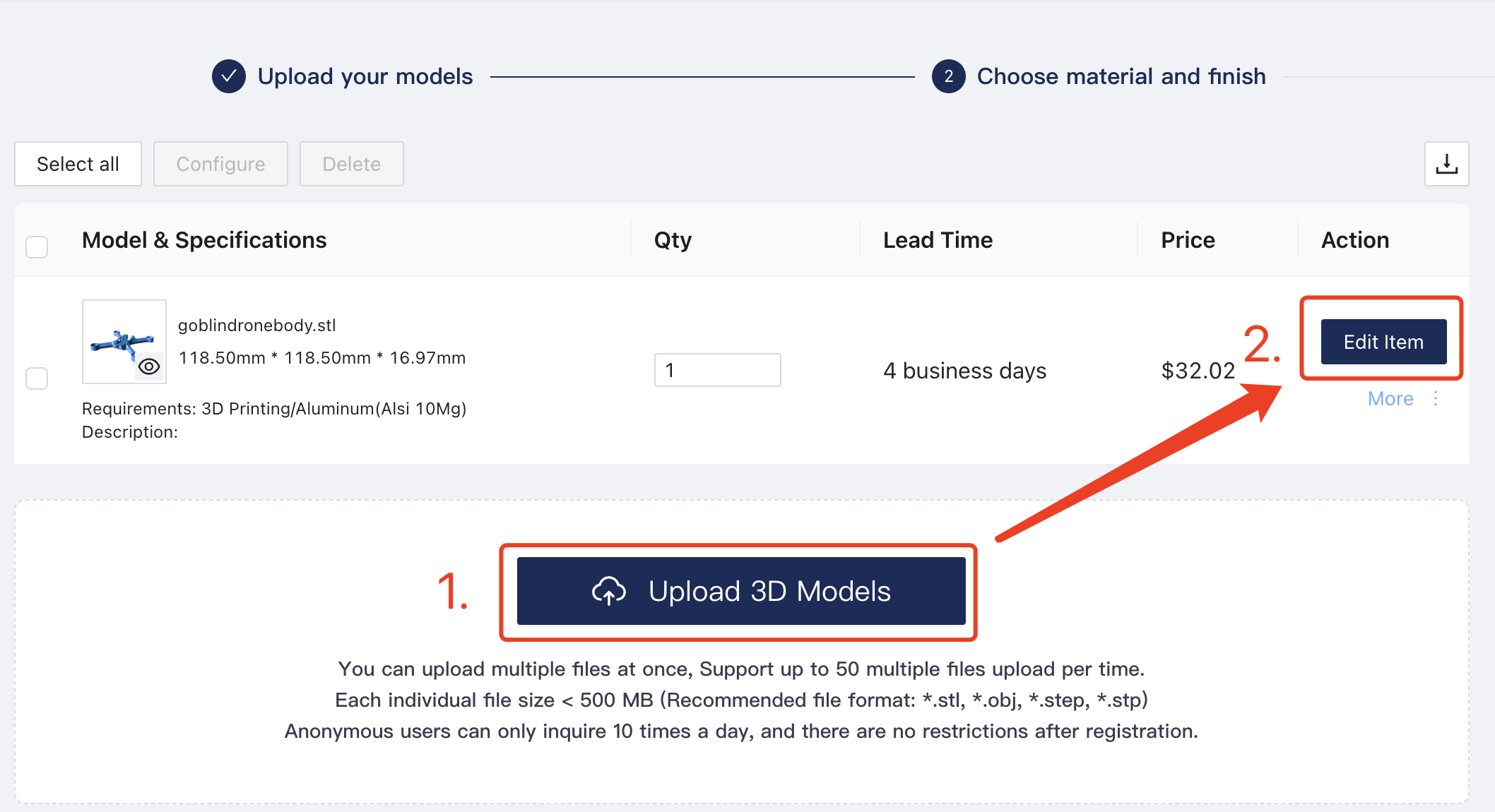
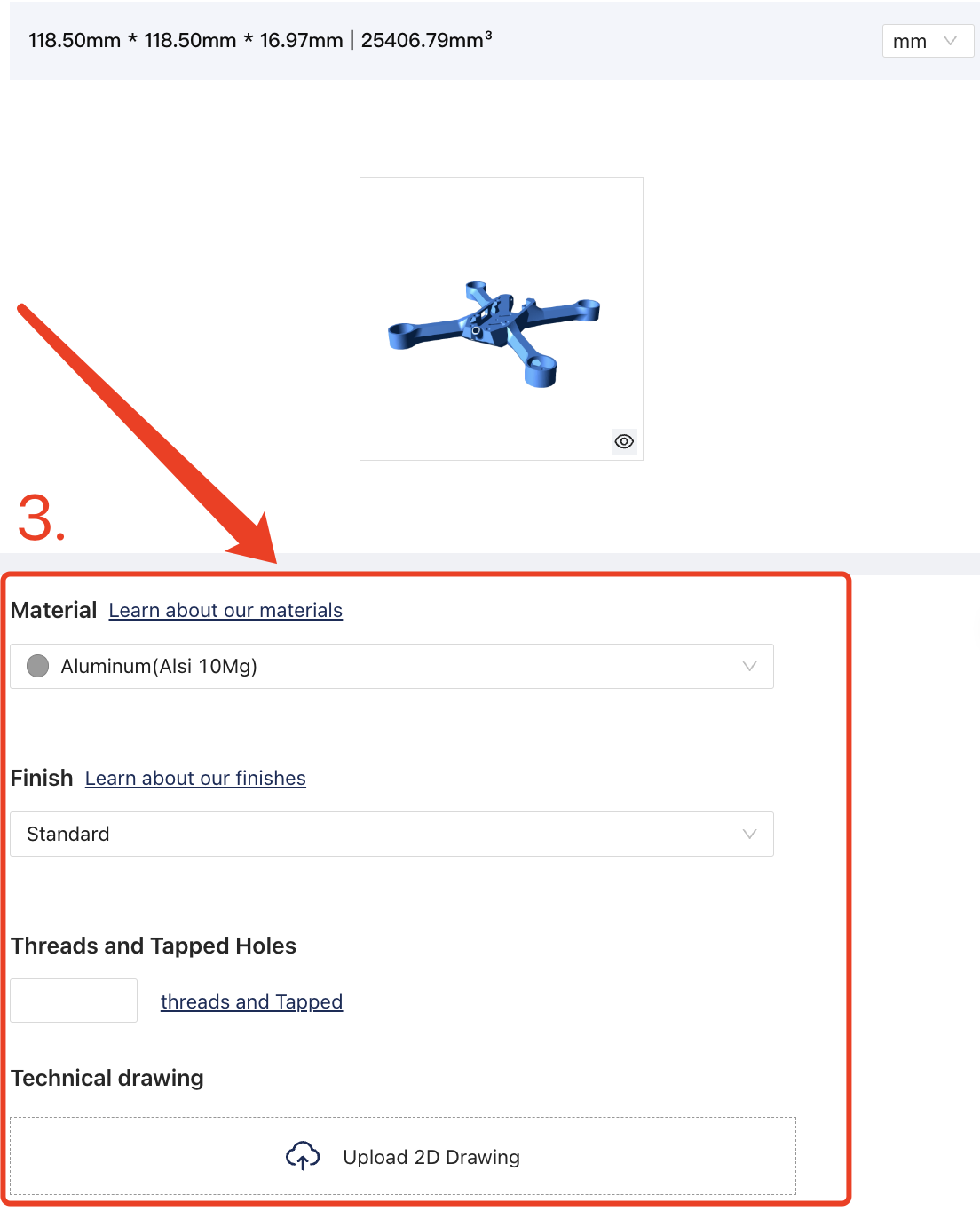

*Note: The estimated cost here indicates the printing cost only, not including others.
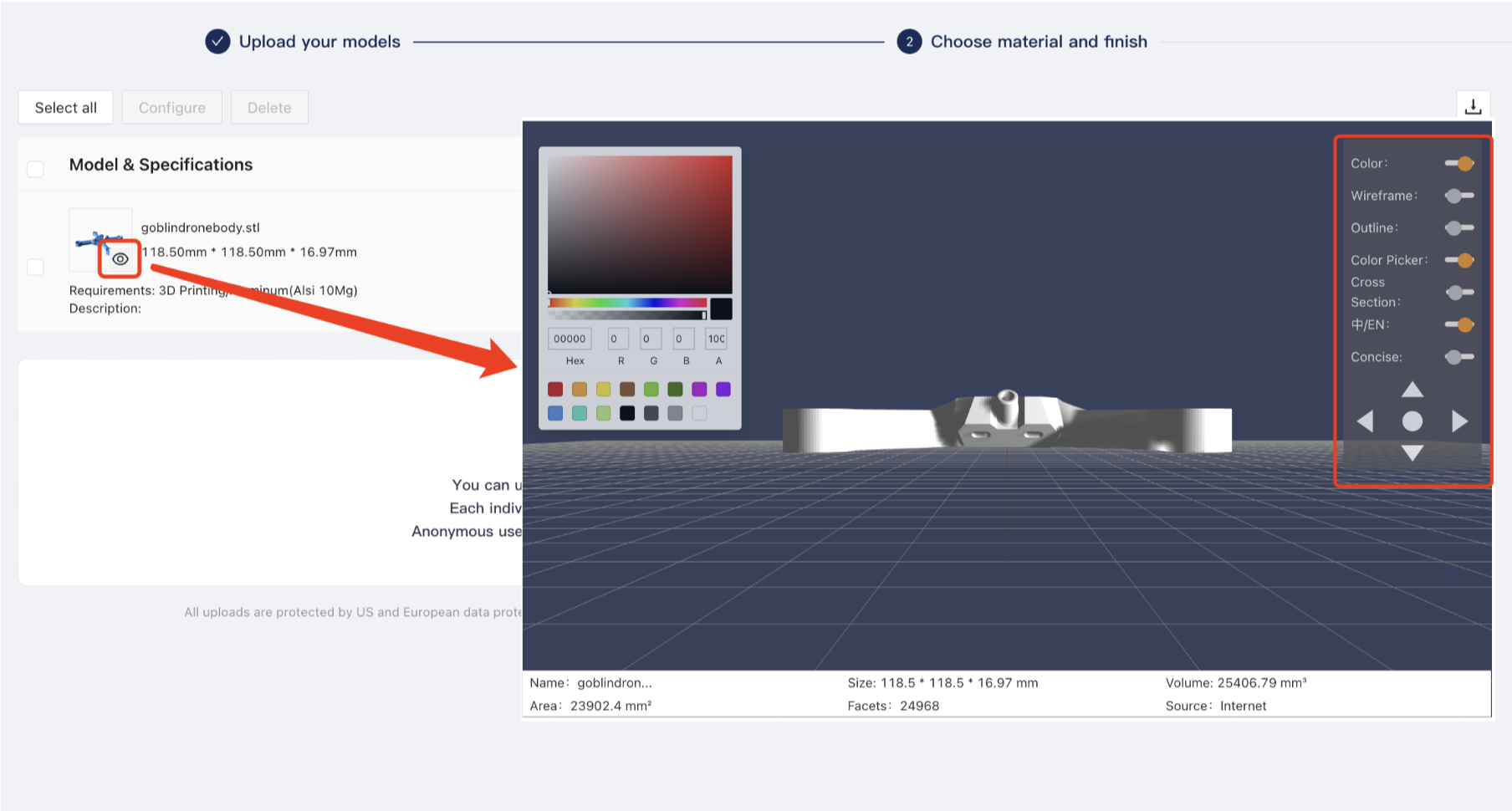
You can also preview the performance after the service via clicking the eye sign below.
If you have never placed an order with Unionfab before, you can now sign up and enjoy a 10% discount on your first order!
Material Cost Breakdown Across 3D Printing Technologies
The cost of 3D printing materials can vary significantly depending on the type of material and the technology used. Here we have listed a table to present the commonly-used 3d printing materials of different 3d printing technologies.
Technology | Material | Type | Average Cost | Common Uses |
|---|---|---|---|---|
FDM | PLA (Polylactic Acid) | Thermoplastic | $20 - $40 | Prototyping, toys, models, household items |
ABS (Acrylonitrile Butadiene Styrene) | Thermoplastic | $25 - $50 | Automotive parts, electronics housings, functional prototypes | |
PETG (Polyethylene Terephthalate Glycol) | Thermoplastic | $25 - $60 | Containers, mechanical parts, food-safe items | |
TPU (Thermoplastic Polyurethane) | Elastomer | $60 - $100 | Flexible parts, phone cases, shock absorbers | |
Carbon Fiber Filled PLA/ABS | Composite | $50 - $120 | High-strength parts, structural components | |
Wood-Filled PLA | Composite | $40 - $60 | Decorative items, furniture prototypes | |
SLA/DLP | Standard Resin | Photopolymer | $50 - $100 | High-detail models, jewelry, dental/medical applications |
Tough Resin | Photopolymer | $100 - $150 | Functional prototypes, mechanical parts | |
Flexible Resin | Photopolymer | $80 - $130 | Soft, flexible parts, wearables | |
SLS | Nylon (PA12) | Thermoplastic Powder | $50 - $80 | Durable parts, gears, automotive and aerospace components |
TPU Powder | Elastomer Powder | $80 - $120 | Flexible parts, seals, gaskets | |
Alumide (Nylon + Aluminum powder) | Composite Powder | $100 - $150 | Rigid prototypes, functional models | |
DMLS/SLM | Stainless Steel | Metal Powder | $300 - $800 | Aerospace parts, medical implants, automotive components |
Titanium Alloy (Ti6Al4V) | Metal Powder | $500 - $1000 | High-strength, lightweight parts for aerospace and medical | |
Aluminum Alloy | Metal Powder | $300 - $600 | Lightweight parts for automotive and aerospace | |
Inconel (Nickel-Chromium Alloy) | Metal Powder | $600 - $1,000 | High-temperature and corrosion-resistant components |
In general, the price of filament used in FDM (such as PLA, ABS) < resin used in SLA/DLP < nylon powder used in SLS < metal powder used in DMLS/SLM.
Post-Processing Cost
Generally speaking, when partnering with 3d printing service providers, some standard finish services such as support removal, cleaning, and sandblasting/shot peening will be provided free of charge.
Other than those, there are some post-processings like laser marking, silk screening, plating, etc. that require additional charge. You can visit Unionfab Finishing Services website to check the detailed performance.
Packaging Fees
Packaging fees may also be added to the final cost, especially for fragile or complex parts that require special care during transportation.
Standard Packaging (Free): The most common packaging for 3D printed parts is the corrugated box with bubble wrap or foam paddings inside.
Protective Packaging (Paid): Depending on the final product, additional protective packaging such as wooden crates or even custom-made flight cases may be required.
Here's a general breakdown of costs:
1. Wooden Crates:
● Simple wooden crates for small to medium-sized parts typically range from $50 to $300.
● For larger or more complex parts, prices can go up to $500 or more, depending on the wood type, size, and level of reinforcement needed.
2. Custom-Made Flight Cases:
● Basic custom flight cases can cost around $200 to $500 for small items.
● For larger, fully customized cases with specialized padding and materials, prices can range from $800 to $2,000 or more.
Shipping Fees
Shipping fees are another important consideration when calculating the total cost of 3D printing, especially for cross-border orders. Different carriers (e.g., USPS, FedEx, DHL) offer varying rates depending on the destination, size, weight, and urgency of delivery.
Customs Duties
When shipping 3D-printed parts internationally, customs duties may apply, depending on the destination country’s import regulations. Customs duties can vary widely, but typically range between 5% to 20% of the total product value, depending on the country’s specific tariff regulations.
Using a 3D Printing Cost Calculator
If you're looking to get an instant, accurate estimate for your 3D printing project, a cost calculator can be incredibly helpful.
Many companies, like Unionfab, offer an online cost calculator that helps you quickly determine the total cost based on material, part weight, and post-processing requirements.
For a comprehensive overview of the top 10 3D printing cost calculators, check out our article here.
In-house vs. Outsourcing: When to Choose Which?
In-house 3D Printing
Pros & Cons
Handling 3D printing internally gives you control over the entire process, but it comes with its own set of benefits and challenges.
Pros:
● Full Control: You manage every aspect of the print, from design to post-processing.
● Faster Iteration: Immediate access to prints lets you quickly test and modify designs.
● No External Fees: No need to pay for service fees or markups.
● Customization: Tailor the printing process to your exact specifications, especially for prototypes or small batches.
Cons:
● Upfront Costs: Printers and materials can be expensive, especially for high-quality machines.
● Maintenance: Ongoing costs for maintenance, repairs, and replacements of parts.
● Limited Scalability: For large, complex prints, in-house printing can become slow or inefficient.
● Operational Costs: Time and effort spent managing the printer and other operational tasks.
How to Save on In-house Printing:
● Choosing the Right Material: Select the most cost-effective material for your print. For example, PLA is affordable for prototypes, but ASA or nylon might be necessary for durability in functional parts. Think about the long-term cost of materials for scaling up.
● Optimizing Your 3D Model: Reduce complexity in your design to use less material and lower print time. Software like mesh optimizers and slicers can also help minimize waste by adjusting the print orientation and reducing supports.
● Using Bulk Printing: If you need multiple parts, consider printing several at once to make the most of your printer’s time. This can reduce the cost per unit and maximize your resources.
● Choosing the Right Printer Technology: Pick the best printer for the job. If you’re just prototyping, an FDM printer might suffice. For high-precision or highly detailed models, consider SLA or another specialized printer.
When to Choose In-house:
● Small to Medium Volume: If you’re working on small batches or prototypes.
● Rapid Prototyping: When you need quick changes or iterations to designs.
● Full Control: If you require flexibility in design, timing, or post-processing.
Outsourcing 3D Printing
Pros & Cons
Outsourcing 3D printing to a service provider offers a different set of advantages and disadvantages. Let’s explore when it’s better to choose outsourcing over in-house printing.
Pros:
● No Equipment Investment: You don’t need to spend on expensive printers, maintenance, or materials.
● Access to High-End Technology: Service providers have specialized printers and expertise, which can be beneficial for complex or high-quality prints.
● Scalability: Outsourcing allows you to easily scale up production without worrying about printer limitations.
Cons:
● Service Fees: You’ll need to pay for the services, which can add up depending on volume and complexity.
● Longer Turnaround: Outsourcing typically means longer wait times, especially for larger or more complicated prints.
● Less Flexibility: You’re reliant on the provider’s schedule, capabilities, and constraints.
How to Save on Outsourcing 3D Printing:
● Choosing the Right Material: Select cost-effective materials that align with your needs and the service provider’s offerings. Some providers may offer discounts on bulk orders or specific material types.
● Optimizing Your 3D Model: Ensure your model is optimized for the specific printer technology the service uses. This can save you from unnecessary post-processing costs or issues with support material.
● Using Bulk Printing: Like in-house printing, ordering large quantities of the same part can reduce the cost per unit, and bulk orders may qualify for discounts.
● Choosing the Right Printer Technology: Work with a service provider that offers the right technology for your project—whether that’s FDM, SLA, or even more specialized technologies like SLS or metal printing.
When to Choose Outsourcing:
● Large Volume Production: If you need to produce large quantities consistently and with high quality.
● Specialized Parts: For parts that require high-end technologies such as SLS or metal printing.
● No Equipment Maintenance: If you want to avoid the costs and time associated with equipment upkeep and material sourcing.
Summary: Which to Choose?
When In-house Printing Makes Sense:
● If you need fast prototyping and the flexibility to make changes quickly.
● For small-scale, customizable projects where you need full control over design, timing, and post-processing.
When Outsourcing Makes Sense:
● If you're producing large quantities of complex parts or need specialized technologies.
● When you want to avoid investing in equipment or managing operational costs.
Best of Both Worlds:
● In some cases, a hybrid approach works best—use in-house printing for rapid prototyping and small runs, then outsource for larger, more complex projects where specialized expertise or high-end printers are needed.
Conclusion
In conclusion, this article has provided a detailed breakdown of 3D printing costs, whether you're handling the printing process in-house or outsourcing it to a service provider. We’ve covered key factors such as material costs, labor, equipment, and how to save on both in-house and outsourced printing.
By understanding these cost components, you can make more informed decisions on how to approach your 3D printing projects in the most cost-effective way.